
Downloading and Building from source
Downloading the source code
Section titled “Downloading the source code”To download the source code for the latest version of Fishstrap, follow the instructions provided:
-
Download Git.
-
Open a terminal window, and navigate to the directory where you want to download the source code to.
-
Type in the following command to clone the repository:
pwsh git clone https://github.com/fishstrap/fishstrap.git --recursive
Git will then download the Fishstrap repository and place it in the current directory.
Building and running the project
Section titled “Building and running the project”To build the project, you have two options:
Using Visual Studio
Section titled “Using Visual Studio”You can also build the project using Visual Studio:
-
Open the project in Visual Studio.
-
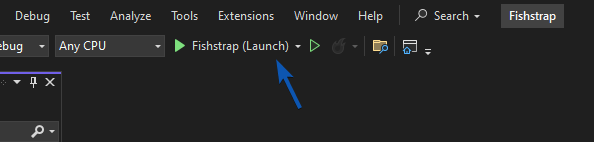
Build the project by either pressing F5 or pressing the Fishstrap (Launch) button.
Using the command line
Section titled “Using the command line”You can use the dotnet command line utility to build the project:
dotnet build -c ReleasePublishing a binary
Section titled “Publishing a binary”To publish the Fishstrap binary, you have two options:
Using Visual Studio
Section titled “Using Visual Studio”- Right click on the solution named “Bloxstrap”.
- Select the Publish option.
- In the publish window, click the Publish button.
Using the command line
Section titled “Using the command line”-
Navigate to the project directory.
-
Run the following command:
pwsh dotnet publish Bloxstrap /p:PublishProfile=Publish-x64
You will find the resulting binary under fishstrap\Bloxstrap\bin\release\net6.0-windows\publish\win-x64.