
Bootstrapper
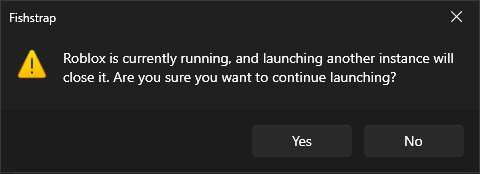
Prompt to confirm closure when launching another Roblox instance
Section titled “Prompt to confirm closure when launching another Roblox instance”Fishstrap will prompt you when launching another instance of Roblox to confirm whether you want to close the existing instance or cancel the launch of another one.
Background updates
Section titled “Background updates”Allows Fishstrap to download new versions of Roblox in the background while you are playing. It will switch to a new Roblox version on the next launch.
Cleaner
Section titled “Cleaner”Fishstrap will automatically remove old data to save on space on your PC.
When should the files get deleted
Section titled “When should the files get deleted”This option selects the cleaner’s threshold for old files. Files older than the selected threshold will be deleted on the next launch.
- Never disables the cleaner.
- After 1 day, After 1 week, After 1 month and After 2 months will enable the cleaner and set its threshold to 1 day, 1 week, 1 month and 2 months respectively.
Which files the cleaner can delete?
Section titled “Which files the cleaner can delete?”The cleaner only deletes these files you have enabled the toggle for:
- Cache: looks for old downloads.
- Logs: looks for old Roblox logs.
- Fishstrap Logs: looks for old Fishstrap logs.
Toggles and their respective paths are shown in the table below.
| Toggle | Paths |
|---|---|
| Cache | %LOCALAPPDATA%\Fishstrap\Downloads, %LOCALAPPDATA%\Temp\Roblox |
| Logs | %LOCALAPPDATA%\Roblox\logs |
| Fishstrap Logs | %LOCALAPPDATA%\Fishstrap\Logs |