
Integrations
Activity tracking
Section titled “Activity tracking”Activity tracking is a component of Fishstrap that lets it run in the background and detect what game you’re currently playing.
This is mainly used for:
- Discord Rich Presence
- Game history
- Server location
When it’s enabled, Fishstrap will stay running in the background while you’re playing, and it’ll show in your system tray. Right-clicking on the tray icon will bring up a menu where you can use its features.
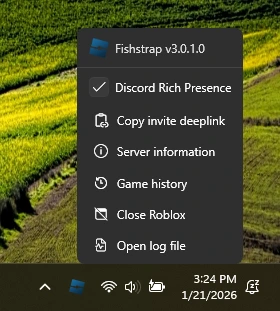
Clicking “Copy invite deeplink” will copy a shareable invite link for your server to your clipboard. This link can be used by anyone with Roblox installed, even players who don’t have Fishstrap.
Some options may not be shown if you’re not currently in a game.
Query server location
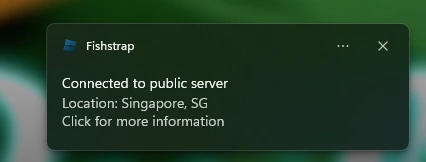
Section titled “Query server location”When in-game, you’ll be able to see where your server is located at via ipinfo.to.
Query server uptime
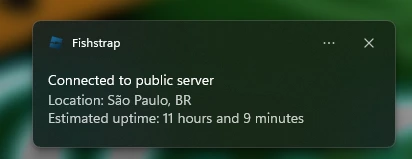
Section titled “Query server uptime”Displays the server’s estimated uptime using data from RoValra’s APIs.
Don’t exit to desktop app
Section titled “Don’t exit to desktop app”When enabled, Roblox will fully close instead of going back to the desktop app.
Discord Rich Presence
Section titled “Discord Rich Presence”Show game activity
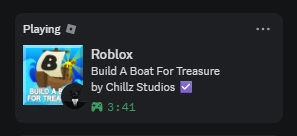
Section titled “Show game activity”The Roblox game you’re playing will be shown on your Discord profile.
Allow activity joining
Section titled “Allow activity joining”Adds a new button in your Discord profile. It allows anybody to join the game that you are currently in through your Discord profile.
Show Roblox account
Section titled “Show Roblox account”Shows the Roblox account you’re playing with on your Discord profile.
Miscellaneous
Section titled “Miscellaneous”Allow multi-instance launching
Section titled “Allow multi-instance launching”Allows for having more than one Roblox game client simultaneously. You cannot launch multiple instances of Roblox for the same account, however.
Custom Integrations
Section titled “Custom Integrations”Fishstrap will automatically launch any other external programs alongside Roblox.
| Settings | Description |
|---|---|
| Name | A label to use for your integration. |
| Application Location | The file path of the program to launch. Must point to an executable file (.exe). |
| Launch Delay | Time in seconds to wait before launching the program. Useful if the program should start after Roblox fully loads. |
| Launch Arguments | Command-line parameters, useful if your program supports it. |
| Auto close when Roblox closes | Fishstrap will automatically close the program when Roblox closes. |
| Pre Roblox Launch | Launch the program before Roblox opens. |